New v1.1.1-secret-files is available!

Store billions of objects. Not billions of files.

S4 Core is an S3-compatible object storage server written in Rust. Append-only volumes keep a billion objects in about a thousand files, deduplication stores every byte once, and a leaderless cluster with erasure coding keeps it all online.

  • Apache 2.0
  • Single binary
  • x86_64 & aarch64
  • fsync before every 200 OK
zsh — s4core
$ docker run -d -p 9000:9000 -v s4-data:/data \
    -e S4_ACCESS_KEY_ID=admin \
    -e S4_SECRET_ACCESS_KEY=change-me \
    s4core/s4core:latest
$ export AWS_ACCESS_KEY_ID=admin AWS_SECRET_ACCESS_KEY=change-me
$ aws --endpoint-url http://localhost:9000 s3 mb s3://photos
make_bucket: photos
$ aws --endpoint-url http://localhost:9000 s3 cp ./cat.jpg s3://photos/
upload: ./cat.jpg to s3://photos/cat.jpg
# That's it. Every S3 tool you already use now talks to S4.

Speaks S3 — tested with the tools you already run

  • AWS CLI
  • rclone
  • restic
  • MinIO mc
  • warp
  • Prometheus
  • Docker · Compose

~1,000

files on disk for a billion objects

1.375×

raw capacity with erasure coding, instead of 3× replication

8.2×

faster EC encoding with the ISA-L codec

0

lines of unsafe Rust in the Community Edition — the compiler forbids it

The inode problem

Your disk isn't full. It ran out of inodes.

Storage that keeps one file per object hits a wall long before the disk fills up. S4 was built around the opposite idea: many objects, few files.

One file per object

the usual way

1,000,000,000 objects → 1,000,000,000 files & inodes

  • No space left on device with terabytes still free
  • Backups, fsck and rsync crawl through billions of directory entries
  • Every small write is a random write plus a filesystem metadata update
S4 Core

append-only volumes

1,000,000,000 objects → ~1,000 volume files + one index

  • Objects are appended to ~1 GB volume files — sequential writes, one fsync before 200 OK
  • The index lives in fjall, an LSM-tree with MVCC — lookups never block writes
  • CRC32 checked on every read; a background compactor gives space back after deletes

Everything in one binary

The S3 you know. The engine you wish it had.

No sidecars, no external database, no JVM. Every feature below ships in the free Community Edition.

S3 API compatible

Signature V4 and V2, multipart uploads, CopyObject, CORS and ListObjects V1/V2. Point your SDK at a new endpoint and keep your code.

Inode-free storage engine

Bitcask-style append-only volumes and a fjall LSM index. Crash-safe journal, fast recovery, and no small-file penalty.

Content deduplication

Content-addressed by SHA-256: identical data is stored once, however many keys point to it. Typically 30–50% less disk.

SQL over your objects

S3 Select on Apache DataFusion for CSV, JSON and Parquet — plus multi-object queries: SELECT … FROM 'logs/*.csv' with JOINs, CTEs and window functions.

Leaderless cluster

Quorum replication (N=3, W=2, R=2): any node serves any request and one node can fail. SWIM gossip, gRPC, HLC clocks.

Self-healing data

Merkle-tree anti-entropy, read repair, hinted handoff, and a bit-rot scrubber that rewrites damaged bytes from a healthy replica.

Versioning & lifecycle

S3 object versioning with delete markers, and lifecycle rules that expire objects and old versions on schedule.

Object Lock (WORM)

Retention periods and legal holds that make backups immutable — the last line of defence against ransomware.

IAM & Admin API

Users with Reader, Writer and SuperUser roles, per-user S3 keys and JWT-authenticated admin endpoints.

Crash-safe by design

Data is on disk before the client hears 200 OK, and a write cut off mid-flight is discarded, never half-kept. CI kills nodes mid-write to prove it.

Observability built in

Prometheus metrics for latency, IOPS, dedup ratio and capacity, a JSON stats API, and MinIO-compatible health endpoints.

Web console & TLS

Manage buckets, objects, users and keys from the browser. TLS through rustls end to end — no OpenSSL anywhere.

Enterprise Federation erasure coding

Survive more failures on half the disks.

Erasure-coded pools store each object as data and parity shards across an erasure set. Reed-Solomon RS(6,3) keeps your data through three lost shards at 1.5× raw capacity — replication needs 3× to survive two. Clients see no difference: body, ETag, size and metadata are preserved.

  1. 1

    Acknowledged on RF=3

    A write lands on three replicas first, so latency stays the same as a replicated pool.

  2. 2

    Encoded in the background

    A transcode worker splits the object into data and parity shards and commits a manifest through the metadata quorum.

  3. 3

    Verified before anything is deleted

    The object is read back from its shards and checked against its SHA-256. Only then, after a grace period, are the hot copies released.

Capacity calculator

How much raw disk your data needs.

1.00 PB

1 TB10 PB

Erasure coding profile
Replication RF=3 · 3.00×3.00 PB
RS(6,3) · 1.50×1.50 PB
Raw disk saved
1.50 PB
50% less
20 TB drives
−75
fewer to buy
Survives
3
lost shards (RF=3: 2)

Steady state for objects of 1 MiB and larger; smaller objects stay replicated unless packed segments are on. New writes land on RF=3 first and are encoded in the background, so keep headroom for them. “Survives” is the loss count guaranteed in every pattern within one erasure set.

Built for operators, not just for benchmarks

  • Six profiles + custom. Reed-Solomon and LRC with local repair groups.
  • Self-healing pools. Repair, anti-entropy, shard scrubbing, orphan GC.
  • Worst damage first. The chunk missing the most shards is rebuilt first.
  • Minimal reads. Only the data shards a read or range needs.
  • Auto-tiering. Cold objects move to EC, hot ones come back to RF=3.
  • Topology-aware. Zone, rack and host labels spread LRC groups across failure domains.
  • Packed segments. Small objects erasure-coded together in large segments.
  • Grow by erasure set. Multi-set pools with round-robin or free-space placement.
  • Node replacement. A new machine takes a dead node's identity and repair refills it.
  • Failure matrix API. Every loss pattern of a pool, and how it is recovered.
Read the erasure coding guide

ISA-L accelerated codec

MiB/s on one core, RS(6,3), 6 MiB chunks

Portable ISA-L
Codec throughput, MiB/s
OperationPortableISA-L
Encode39318
Degraded read44475
Shard repair119928

Both engines write byte-identical shards: mix them in one cluster and switch with a restart. The x86_64 Enterprise image ships with ISA-L. Measured on an AMD Ryzen 9 7940HS.

Architecture

Simple layers. No surprises.

One process from the HTTP socket to the disk. The cluster layer switches on when you need it.

01Network & protocol

Axum · Tokio
HTTP/1.1 & HTTP/2TLS via rustlsAWS SigV4 / V2S3 API

02Business logic

Rust domain crates
SHA-256 dedupVersioning & lifecycleObject LockIAM & policiesSQL (DataFusion)

03Cluster optional

S4_MODE=cluster
SWIM gossipgRPCQuorum W=2 / R=2HLC + LWWMerkle anti-entropyErasure coding (EE)

04Storage engine

Bitcask-style
fjall LSM index (MVCC, LZ4)~1 GB append-only volumesCRC32 per blobBackground compactor

Life of a PUT

  1. 1

    Hash the body with SHA-256

  2. 2

    Seen this content before? Reference it instead of writing it again

  3. 3

    New content is appended to the active volume

  4. 4

    Index, dedup and version records commit in one atomic batch

  5. 5

    fsync, then 200 OK — never the other way round

Inside the storage engine

Editions

Start free. Scale without limits.

Both editions are built from the same code and released together, with the same version number.

Community

For teams that want solid S3 storage today.

Freeforever · Apache 2.0

  • Every feature on this page except erasure coding
  • Single node, or a 3-node cluster with quorum replication
  • Anti-entropy, read repair and bit-rot healing
  • Web console, IAM, Prometheus metrics
  • No time limits, no feature nags, no phone-home
Deploy Community Edition
For scale

Enterprise

For petabytes, many pools and strict budgets.

Licenseverified offline

  • Everything in Community
  • Unlimited pools and nodes per cluster
  • Erasure-coded pools: RS and LRC, 1.375×–1.75× raw capacity
  • ISA-L codec, auto-tiering, multi-set pools, packed segments
  • Topology-aware placement and node replacement

On the roadmap: LDAP, SAML and OIDC sign-in, WebDAV access, audit log and a deep SHA-256 scrubber.

Talk to us about Enterprise
Feature comparison between Community and Enterprise editions
CapabilityCommunityEnterprise
S3 API, versioning, lifecycle, Object Lock
Deduplication, compaction, crash recovery
IAM, web console, S3 Select & multi-object SQL
Quorum replication, anti-entropy, bit-rot healing
Cluster size1 pool · 3 nodesunlimited
Erasure-coded pools (RS, LRC, custom)
ISA-L accelerated codec
Auto-tiering RF=3 ⇄ EC, multi-set pools, packed segments
Topology-aware LRC placement, node replacement with shard rebuild
LicenseApache 2.0Elastic 2.0
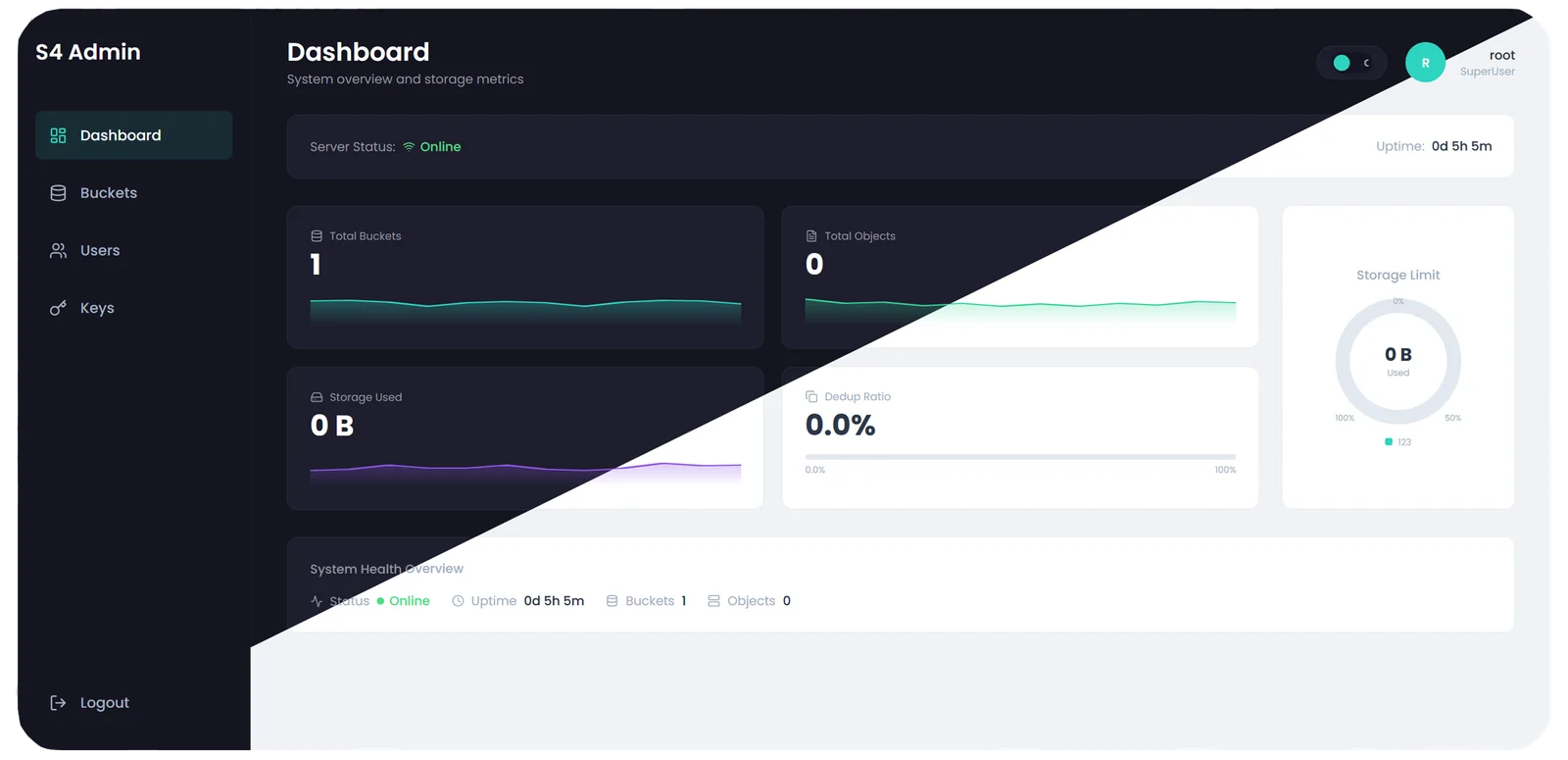
S4 web console dashboard showing server status, bucket and object counts, storage used and the deduplication ratio

Live demo

Kick the tires. Nothing to install.

A public sandbox with the web console and the S3 API. It resets every 10 minutes — don't upload anything private.

Web console

Open

login root · password password12345

S3 API

$ export AWS_ACCESS_KEY_ID=my-secret-key_id
$ export AWS_SECRET_ACCESS_KEY=my-secret-access-key
$ aws --endpoint-url http://63.141.251.44:10117 s3 ls

Quick start

Up and running before your coffee cools.

Pick how you want to run it. Every snippet is complete — copy, paste, done.

# Run the Community Edition
$ docker run -d --name s4core -p 9000:9000 -v s4-data:/data \
    -e S4_ACCESS_KEY_ID=admin \
    -e S4_SECRET_ACCESS_KEY=change-me \
    s4core/s4core:latest

# Talk to it with any S3 client
$ export AWS_ACCESS_KEY_ID=admin AWS_SECRET_ACCESS_KEY=change-me
$ aws --endpoint-url http://localhost:9000 s3 mb s3://my-bucket
$ aws --endpoint-url http://localhost:9000 s3 cp ./file.txt s3://my-bucket/

FAQ

Questions, answered.

Is S4 Core ready for production?

Yes. Since v1.1 S4 Core ships as a production release. Every write is on disk before the client gets 200 OK, and crash recovery, cluster durability and bit-rot healing are covered by automated suites in CI. Erasure-coded pools also report a production_ready flag, set only on builds that passed the full EC acceptance suite.

Can I move my data from another S3 server?

Yes. S4 speaks the S3 API, so rclone sync or mc mirror copy buckets across without any special tooling. S4 also answers MinIO-compatible health and Prometheus endpoints, so existing probes and dashboards keep working.

What exactly is limited in the Community Edition?

Only cluster size and erasure coding. Community runs one node or one pool of up to three nodes with full quorum replication, self-healing and every S3 feature. There is no time limit, no user limit and no data limit, and the code is Apache 2.0.

Does the Enterprise license call home?

No. The license key is signed with Ed25519 and verified locally, so air-gapped clusters work. Without a key, the Enterprise image simply runs as Community Edition.

Which clients and tools are supported?

Anything that speaks S3, including the AWS SDKs. Our test suites drive S4 with the AWS CLI, rclone, restic, MinIO mc and the warp benchmark; both Signature V4 and V2 are supported.

What hardware do I need?

A Linux machine on x86_64 or aarch64 and a disk. S4 is a single binary with no external database. For erasure coding, the ISA-L codec runs on x86_64; AVX2 is enough — AVX-512 adds under a percent.

How does deduplication affect my data?

It is invisible to clients. Each object's content is hashed with SHA-256; identical content is stored once and reference-counted. A blob that fails its hash on read is never reused for new writes, so damage cannot spread through deduplication.

Stop counting inodes.
Start storing objects.

One command gives you an S3 endpoint on your own hardware.

$ docker run -d -p 9000:9000 -v s4-data:/data -e S4_ACCESS_KEY_ID=admin -e S4_SECRET_ACCESS_KEY=change-me s4core/s4core:latest